
Digital eye strain can cause tired, sore or dry eyes, blurred vision, headaches and neck or shoulder discomfort during or after prolonged screen use. For many people, symptoms improve with regular visual breaks, a better screen setup, more frequent blinking and correction of any vision problem that is adding to the strain.
Digital eye strain is uncomfortable, but it is not usually a sign that normal screen use is permanently damaging the eyes. If symptoms continue despite rest and workstation changes, get worse, or your current glasses no longer seem to help, arrange an eye examination rather than assuming the problem is only screen fatigue.
Quick Answer: How Can You Reduce Digital Eye Strain?
- Take regular breaks from continuous near work and use the 20-20-20 approach as a simple reminder.
- Position the monitor at a comfortable viewing distance and height so you are not leaning, craning or tilting your head.
- Reduce glare and reflections from windows, lights and the screen.
- Increase text size and adjust brightness and contrast so you are not squinting or moving closer to read.
- Blink regularly, especially during concentrated screen work.
- If dryness is part of the problem, consider whether room airflow, contact lenses or dry eye may be contributing.
- Have your prescription reviewed if blur, headaches or focusing difficulty persist.
LOCAL CARE. BRIGHTER TOMORROWS.
Still dealing with screen discomfort?
If blur, dry eyes or headaches keep returning despite screen breaks and setup changes, an eye examination can help you understand what may be contributing.
Find an Optometrist →What Is Digital Eye Strain?
Digital eye strain, sometimes called computer vision syndrome, describes a group of eye, vision and musculoskeletal symptoms associated with prolonged use of computers, phones, tablets and other digital devices.
Healthdirect describes eye strain as a common problem that can occur after concentrating on a screen or other near task for a long time. It is not a single disease. Reduced blinking, sustained near focus, glare, poor lighting, posture and an unsuitable prescription can all contribute.
If you are mainly looking for information about symptoms, possible causes and when to get help, see Digital Eye Strain Symptoms in Australia . This page focuses on practical ways to reduce screen-related discomfort.
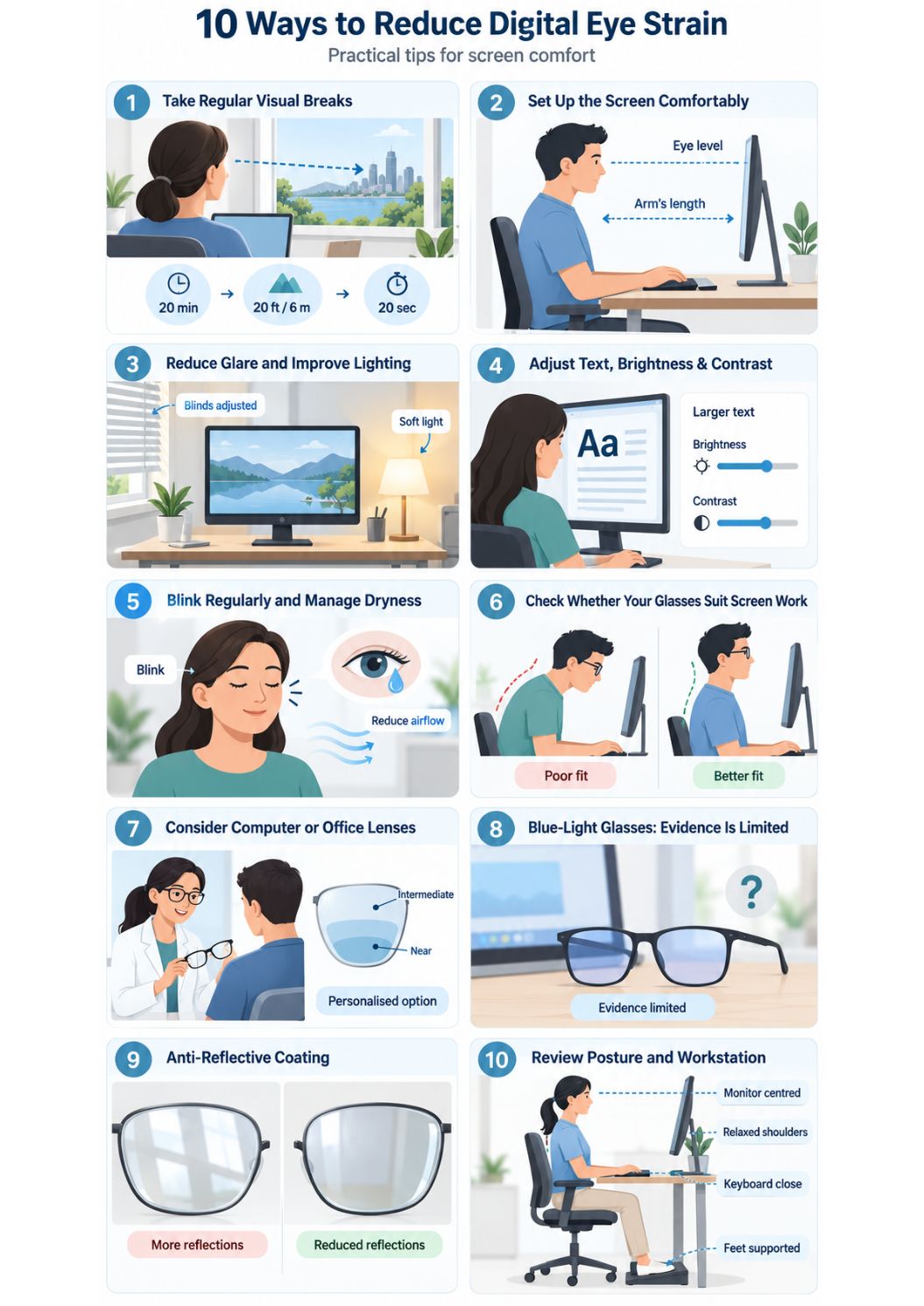
1. Take Regular Visual Breaks
Healthdirect recommends taking regular breaks when using computers and phones for long periods. The aim is to interrupt continuous near focus and give your eyes opportunities to look farther away.
Using the 20-20-20 Approach
A simple reminder is the 20-20-20 approach: every 20 minutes, look at something about 20 feet (6 metres) away for 20 seconds. It is a practical break strategy, not a cure or a guarantee that symptoms will disappear.
You do not need to measure exactly 6 metres. Looking across a room, through a window or toward another distant object is usually enough to interrupt sustained near work.
Use Longer Movement Breaks as Well
Eye breaks are more useful when they are part of broader movement breaks. Stand up, change posture, walk briefly or complete a task away from the screen. Comcare advises workers to move away from the desk regularly rather than staying in one position for long periods.
2. Set Up the Screen for Comfortable Viewing
There is no single screen distance or height that suits every person, monitor and prescription. The goal is a position that lets you read comfortably without leaning forward, twisting your neck or lifting your chin.
Monitor Position
Comcare recommends placing a single monitor directly in front of you at about an arm's length and adjusting the height to reduce head tilt. Healthdirect also recommends positioning the top of the screen around eye level or slightly below it.
If You Use Two Monitors
If one screen is used most, place that screen directly in front of you. When both are used frequently, position them close together and angle them to reduce repeated head and neck twisting.
If You Wear Multifocal or Progressive Lenses
Monitor height may need to be adjusted so you can view the screen through the appropriate part of the lens without tipping your head back. If you are repeatedly craning or changing posture to see clearly, discuss the setup and prescription with your optometrist.
3. Reduce Glare and Improve Lighting
Bright reflections and poor lighting can make screen work less comfortable. Comcare recommends angling monitors away from windows and lights where possible, while Healthdirect advises adjusting the workspace to reduce glare and reflection.
- Position the screen so bright windows or overhead lights are not reflected directly in it.
- Adjust blinds or room lighting if sunlight creates strong glare.
- Keep the screen clean, because dust and fingerprints can make reflections more noticeable.
- Use task lighting for documents or reading rather than making the entire room excessively bright.
- Avoid working in a very dark room with a very bright screen if the contrast feels uncomfortable.
4. Adjust Text Size, Brightness and Contrast
If you need to lean toward the screen or squint to read, increase the text size or display scaling rather than forcing yourself to work with very small text. Healthdirect recommends adjusting screen contrast, brightness and word size to improve comfort.
There is no evidence-based universal brightness percentage that suits every room. Adjust the display so text is easy to read and the screen does not feel glaring compared with the surrounding light.
5. Blink Regularly and Manage Dryness
People tend to blink less often when they concentrate on a screen. Healthdirect notes that this can dry the eye surface and contribute to tired or uncomfortable eyes.
Make a conscious effort to blink fully during concentrated tasks. If air from a fan or air conditioner blows directly across your face, changing the airflow may also help reduce evaporation.
What If Your Eyes Still Feel Dry?
Lubricating eye drops, also called artificial tears, may help some people with dryness. Ask a pharmacist, optometrist or doctor which product is suitable if symptoms are frequent, you wear contact lenses, or you have other eye conditions.
If dryness, burning, grittiness, watering or fluctuating blur is a major part of the problem, see Dry Eye Syndrome in Australia .
6. Check Whether Your Glasses Suit Screen Work
Eye strain can be worse when a prescription is outdated or does not suit the working distance. Healthdirect lists unsuitable glasses or contact lenses as one possible contributor to eye strain.
This does not mean everyone who uses a computer needs special computer glasses. Some people are comfortable in their normal prescription, while others may benefit from a separate near or intermediate prescription or an occupational lens design.
Signs Your Current Setup May Need Review
- You repeatedly lean closer to the monitor to read.
- You take your glasses off to see the screen more clearly.
- You tilt or lift your head to find a clear part of a multifocal lens.
- Blur or headaches continue even after taking regular breaks.
- Your current glasses no longer feel as clear or comfortable as they used to.
7. Do You Need Computer or Office Lenses?
Task-specific lenses can be useful for some people whose normal glasses do not provide comfortable vision at their usual computer or desk distance. The appropriate prescription depends on your existing correction, working distance, age, other visual tasks and whether you need to see beyond the desk.
They should be discussed as one option, not as a routine requirement for everyone with screen symptoms.
8. Do Blue-Light Glasses Reduce Digital Eye Strain?
Current high-level evidence does not show a clear short-term eye-strain benefit from blue-light filtering spectacle lenses compared with non-filtering lenses.
A 2023 Cochrane review of 17 randomised trials found that blue-light filtering lenses may not reduce short-term visual fatigue associated with computer use. Blue-light filtering should therefore not be treated as the main solution for digital eye strain.
For the evidence and limitations, see Blue Light Glasses Australia .
9. Can Anti-Reflective Coating Help?
Anti-reflective coating reduces reflections from spectacle lens surfaces. This can make reflections less distracting, especially with some high-index lenses, but it does not treat every cause of digital eye strain and does not eliminate glare from the environment.
For a full explanation of benefits, limitations and care, see Anti-Reflective Coating for Glasses .
10. Review Your Posture and Workstation
Neck, shoulder and back discomfort can occur alongside eye strain when the screen or chair setup encourages awkward posture. Comcare recommends adjusting the desk, chair, monitor, keyboard and mouse to suit the user and varying posture during the day.
- Keep the main monitor directly in front of you.
- Avoid repeatedly twisting to view a second screen.
- Keep the keyboard and mouse close enough that your shoulders remain relaxed.
- Change position regularly instead of holding one posture for long periods.
- If discomfort continues, ask your workplace about an ergonomic assessment.
Is Your Eye
Health on Track?
Complete our free 18-point checklist to check your eye health, spot any gaps, and take charge of your vision.
Start Free Checklist Test →When Should You Book an Eye Test?
Arrange an eye examination if symptoms do not improve after resting your eyes and making reasonable screen or workstation changes, or if symptoms are getting worse. Healthdirect also recommends an eye check if your glasses no longer seem to help as much as they used to.
An optometrist can check your prescription and eye health and consider whether dry eye, focusing or binocular-vision factors, or another eye problem may be contributing. The exact tests depend on your symptoms and examination findings.
For more about the examination process, see Eye Test in Australia: What to Expect .
When Symptoms Need Prompt or Urgent Care
Digital eye strain should not be used to explain sudden or severe eye symptoms. Seek prompt medical or optometric assessment for a sudden change in vision, severe eye pain, a painful red eye, marked light sensitivity, an eye injury or other symptoms that feel significantly different from usual screen-related discomfort.
A Simple Screen-Comfort Checklist
LOCAL CARE. BRIGHTER TOMORROWS.
Ready to take the next step for your eyes?
If screen breaks and a more comfortable setup haven’t eased your symptoms, find a local independent optometrist to discuss your vision and eye health.
Find an Optometrist →Frequently Asked Questions
What is the best way to reduce digital eye strain?
Start with regular visual breaks, a comfortable screen position, reduced glare, readable text size and frequent blinking. If symptoms persist, have your vision and eye health checked rather than relying on one product or screen setting.
What is the 20-20-20 rule?
Every 20 minutes, look at something about 20 feet (6 metres) away for 20 seconds. It is a simple reminder to interrupt continuous near focus.
How far should my computer screen be from my eyes?
A comfortable arm’s-length distance is a practical starting point for many desktop setups, but the best distance depends on screen size, text size, prescription and individual comfort.
Should the top of my monitor be at eye level?
The goal is to avoid repeated head tilt or neck strain. Australian guidance commonly recommends placing the screen around eye level or slightly below, then adjusting it for your prescription and posture.
Why do my eyes feel dry when I use a computer?
Concentrated screen work can reduce blinking, which can make tears evaporate more quickly. Dry eye disease, contact lenses, room airflow and other factors can also contribute.
Do blue-light glasses help digital eye strain?
Current evidence does not show a clear short-term benefit for reducing computer-related eye strain compared with non-blue-light filtering lenses.
Can I reduce eye strain without buying new glasses?
Yes. Breaks, display adjustments, glare control, blinking and workstation changes may help. New or task-specific glasses are only needed when your prescription or working distance indicates a benefit.
Are computer glasses different from reading glasses?
They can be. A computer screen is often used at an intermediate distance, while standard reading glasses may be prescribed for a closer distance. The correct lens depends on your working setup and prescription.
Can digital eye strain damage my eyes permanently?
Digital eye strain is generally associated with temporary discomfort rather than permanent eye damage. Persistent symptoms should still be assessed because other eye problems can produce similar symptoms.
When should I see an optometrist for eye strain?
Book an eye examination if symptoms continue despite rest and workstation changes, become worse, or your current glasses no longer seem to work as well.
Australian Made Vision is an independent directory that helps patients find optometrists across Australia who may offer Australian-made spectacle lenses. We do not provide clinical services and recommend contacting practices directly to confirm the products and services they offer.